I've subscribed a web host service MochaHost, as a result, this blog will not be maintained and please visit the new blog.
因為我申請了一家網頁服務,所以我把blog都移到新的我個人的domain name去了,在這裡。目前更新的都是有關J2EE的東西。
I've subscribed a web host service MochaHost, as a result, this blog will not be maintained and please visit the new blog.
因為我申請了一家網頁服務,所以我把blog都移到新的我個人的domain name去了,在這裡。目前更新的都是有關J2EE的東西。
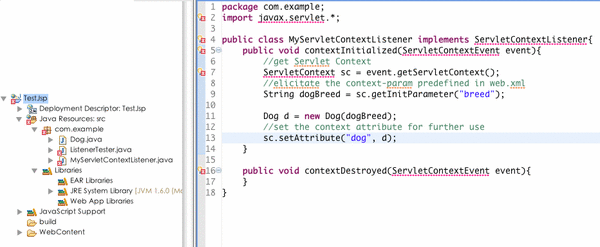
I'm now attending a Java class in Carnegie Mellon University and I'm now practicing building Java Servlet and JSP by following the textboox--Head First Servlet & JSP.
In the very beginning, I practiced by using text editor to conduct all the codes from textbook. However, I found that it must be more convenient to use Eclipse.
And I have already installed Eclipse 3.4.2 on my Mac. Before I successfully run a simple servlet by Eclipse, there were a bunch of hassles I've encountered.
Therefore, I'd like to write these down so that I won't forget how I overcame them.
The details of my development environment is Eclipse J2EE 3.4.2, Tomcat 6, Macbook Pro,
I just arrived in Pittsburgh in 6/16, and I just settled down. In the past 2 weeks, I prepared my room, ate Chi-Yu's gourmet, took a lot of excercises and went shopping. Today is the second Saturday since I arrived in Pittsburgh, and we went to the PNC Park for the Pirates and Royals contest.
This is my first time to enter such a huch park in US, and it is really huge. It is Saturday yesterday and there were a firework show after the game so that we could't get any tickets for seat so we just stand and enjoyed the game. I brought my DSLR to the game and I took a lot of pictures about the park and game and the fireworks which was fired after the game.
Young, who is a player of Pirates just hit a 3 run homerun in that game. As a result, the Pirates won the game and all the people were crazy.
In our way to PNC park, we took a bus, and there was an African American who harassed Ada and Cinthia. He talked to them and then sang a song from the dead Michael. I just could't understand why those people love to make others uncomfortable. Maybe that's what called Cultural Differences.
In the end of the day, I were totally exhausted after watching the game because I woke up at 7:10 for jogging and I didn't nap at all whole day.

之前本來我是用Adium的,但最近常常用到google talk,而且我家老大今天也買了MacBook,所以想要只開iChat統合其他的AIM軟體。(尤其是MSN for Mac因為我之前愛玩裝了Safari 4 Beta結果出現BUG,所以這需求更加急迫)
還好,這個需求可以透過Jabber來解決,我裝完後也沒有網路上找到的教學文章所說的第一次用iChat登入MSN時會一直跳出新增聯絡人的問題,有需要的朋友請服用下文。
一、註冊Jabber帳號
我是使用Adium去註冊Jabber帳號,首先開啟Adium,選擇Adium->偏好設定
增加一個新帳號選Jabber
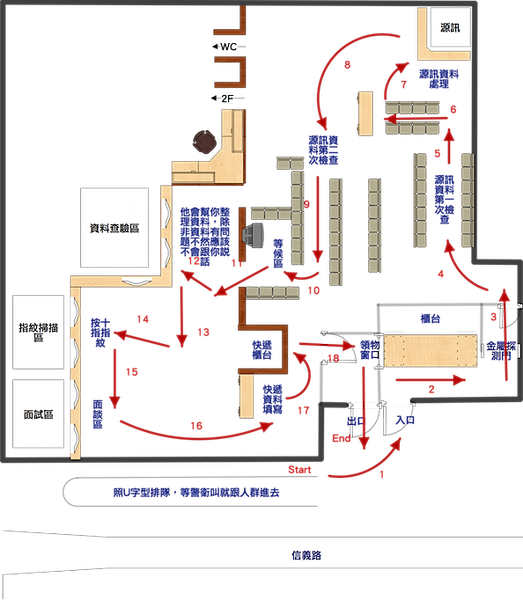
之前在準備辦美簽時預約了3月31日早上八點半,所以今天早上七點起床,出去吃個早餐就騎車到AIT去了。
AIT在信義路上,建國南路和復興南路中間,師大附中(母校)正對面。
我07:40就到了,一到就看到外面一票人在排隊,想說還要等很久吧,就跑到對面7-11買杯咖啡邊喝邊等。
到了08:15左右,警衛把門口告示的牌子上的時間換成08:30並宣布八點半的預約申請人請在牌子後方排隊,
隊伍在牌子後面排一直線,排到最後面再繞個u字形。
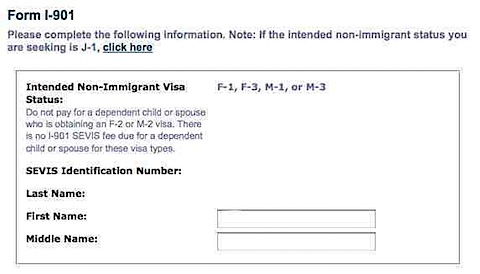
今天從UPS手上拿到熱呼呼的I-20,之前就有在PTT上看過文章,也就是拿到I-20之後就是要準備辦美簽啦。所以今天找資料順便整理一下所有的步驟以及注意事項,因為我下周才要實際去跑,所以這篇文會隨時修改喔!以下中英文夾雜因為有些是從我學校寄來的說明上照抄下來的,我會給上翻譯。
1.確認你的I20上的英文名字和你的護照上一模模一樣樣
2.pay the SEVIS fee of $200 before applying F-1 visa(付SEVIS費用200美金)
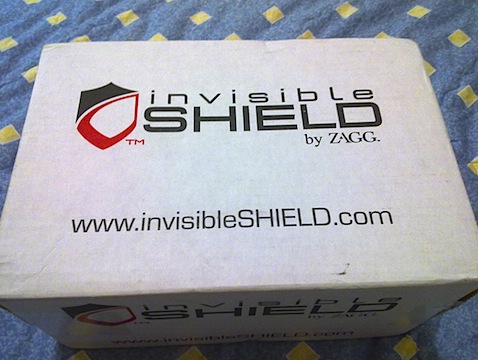
昨天晚上看電視看到半夜2點多本來想睡了,結果亂轉台又看到變臉(Face Off)正開始播,忍不住又看下去,最後五點才睡覺,今天一整個快歸天的感覺,早上去老地方摳了一早上,中午回家才放下包包沒多久,門鈴就響了。是郵差@@?,我的I20昨天才從PA寄出應該沒那麼快到吧XD,下樓拿信結果居然是這個東西!
ZAGG invisibleShield for Macbook 15" 2Gen Fullbody coverage
從Salt-Lake City寄出的,我是上周一定的,今天就到了,花了9天時間,我在ZAGG網站上定時他給我們2種運送方式,一種是UPS,運費要50USD左右;另一種就是我採用的美國郵政?吧,網站上說明是3周內會到,結果9天就到了,效率還算不錯@@!
雖然蠻急著要把我的小鋁包的密不透風不給她脫光光的,但是還是記著要拍點開箱照。
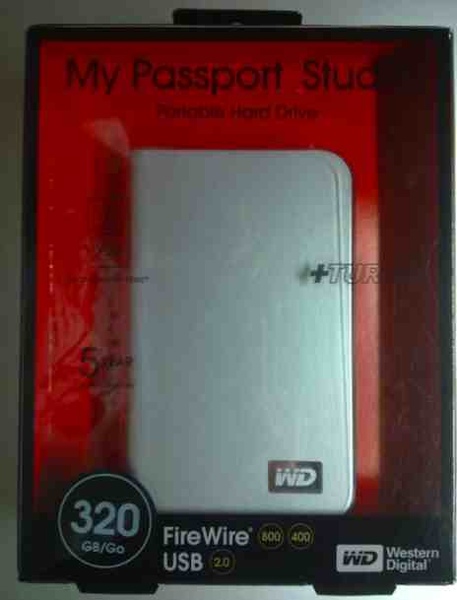
因為實在害怕我的Macbook Pro的硬碟會突然掛點,那我的程式碼和找了好久的MAC軟體就全都會不見了QQ
所以最近一直在作備份的功課,採購重點是要有Firewire800介面,不然MBP上面的FW800就浪費啦!
本來在考慮中的機子有Macpower Daisy Cutter+WD5000BEVT or WD,
今天下大雨,去光華逛街看看價錢,結果FW800的外接盒很少有在賣的,最後終於找到一家有賣,
這家我想看的兩款都有,不過買WD這款比較便宜一點,所以我就敗入了WD My Passport Studio 2.5" 320GB外接式硬碟。
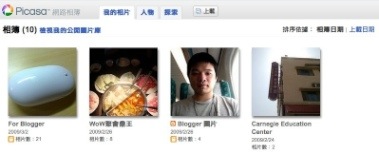
Google的網路服務實在是很俗又大碗,除了我每天用一次還用3個的GMail容量居然是7GB之外,他的網路相簿服務也有1GB以上,大概是美國人什麼都大(去美國念書的同學說的…)的關係吧。
我最近開始使用MAC電腦,所以開始寫起BLOG和管理以前的照片,我使用iPhoto'08(因為我機器配的是08),不過我在Apple網站有看到新的'09的keynote,裡面有2個新增的檢視方式:Faces & Places,昨天我發現Google Picasa裡面同樣內建了這2種功能,可以讓手上沒有Mac電腦無法使用iPhoto'09的朋友也看看這還蠻好玩也蠻方便的技術。
首先當然你要有一個GMail帳號,如果你沒有的話,可以去申請一個反正免費,現在手上沒有Gmail帳號的人應該不多了吧…我邀請函還有9X個不知道要作什麼QQ
直接來網路相簿這登入吧,登入後建議您先上載幾張有人臉的照片才能試玩喔!上傳幾張後大概如下圖。
請點上方頁籤中的「人物」進入
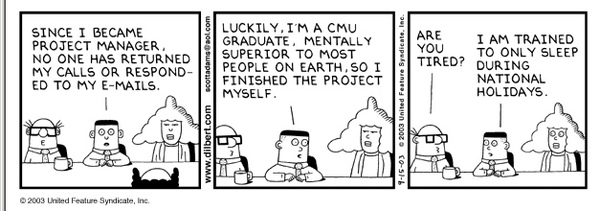
簡單翻譯:
左:自從我成為專案經理後,就沒有人會回我電話和EMAIL了…
中:幸運的是,我是Carnegie Mellon University畢業的,在心理上就比地球上大多數人優越,所以我獨力完成了這個案子
右1:你累了嗎@@?
右2:我早已被訓練成只在國定假日睡覺了
本來很久之前在這邊就有一個帳號,寫了幾篇後好像對Blog熱情又減少了,結果就整個荒廢長雜草XD
最近因為買了新的laptop,然後不知怎的又燃起寫Blog的興緻,可能也是因為準備要出國了,
想說出國後還是可以繼續寫,這樣才有留下一些記錄。
之前在選BSP的時候也找了一些文章看看大家的評價,本來在WordPress先註冊了一個帳號也寫了幾篇文章,
甚至還付費買了CSS功能,結果他的付費CSS功能實在令我大失所望,今天逛網頁時看到Pixnet和無名的比較,

今天小弟來介紹一下MAC上的螢幕載圖軟體,點圖下方大圖可進入Skitch網站,下面還有影片教學
最近試用過幾款載圖軟體,還是覺得Skitch最好用,Skitch我認為有以下幾點優點
1. 好看--這好像不用解釋,MAC上不好看的軟體似乎不多2. 即時編輯--圖抓下來後直接可以編輯、塗鴨,不用再開別的軟體貼上再編輯3. 即時分享--在載完圖編輯完後,按一個鍵就可以將圖片上傳到Skitch網站,並且會給你一個連結讓你可以在部落格或是論壇上公怖4. 資訊保留--在Skitch上會幫你記住你曾經載了哪些圖,有沒有上傳到SkitchH網站,如果有上傳的話分享網址是多少5. 整合性--你可以在Skitch加入你的圖片資料夾(預設已有iPhoto),然後你可以在你自已的圖片雙擊,就可以在Skitch上主畫面開啟該圖,然後編輯後存檔或是上傳分享6. 浮水印--可以在你編輯過的圖片中加入浮水印,不過只能是文字
以上先簡介SSkitch的優點,下面小弟從Skitch網站註冊開始順序說明如何取得Skitch、安裝、使用說明。以下說明當然是使用Skitch直接用圖片說明啦!
一、如何取得並安裝Skitch?要使用Skitch必須要在Skitch網站註冊,請點圖本文最上方的Skitch照片即可進入官方網站

